Install VVChat on Android & iPhone
Get the safe family messaging app directly on your family's phones and tablets. Featuring walkie-talkie voice notes, camera video clips, and guided prompt starters. Available on Google Play for Android and the Apple App Store for iPhone & iPad, with instant web app access everywhere.
How to Install on Android Devices
Download the official VVChat app directly from the Google Play Store for Samsung Galaxy, Google Pixel, Motorola, OnePlus, and all modern Android devices.

com.fredlu.vvchat
Open in Google Play
Tap the Google Play download button above on your Android phone or tablet, or search for "VVChat" in the Google Play Store app.
Tap "Install"
Tap the green "Install" button. Google Play will securely download and install VVChat, adding the app icon directly to your home screen.
Sign In or Enter Claim Code
Parents sign in with their approved email to manage the household. Children enter an 8-character claim code (e.g., ABCD-1234) generated by the parent to start chatting without an email or password.
Allow Push Alerts
When prompted, tap "Allow" for notifications so children and parents receive immediate chimes whenever family members write new messages.
Alternative: Use as Progressive Web App (PWA)
Using a Chromebook, Amazon Fire tablet, or preferred browser? You can also install VVChat as a web app: Open Chrome or Samsung Internet, visit chat.vvchat.app, tap the browser menu (⋮), and select "Install app" or "Add to Home screen".
How to Install on iPhone & iPad
Download the official VVChat app directly from the Apple App Store for iPhone and iPad (iOS 15.0 or later).
6798837012
Open in App Store
Tap the Apple App Store download button above on your iPhone or iPad, or search for "VVChat - Family Messaging" in the App Store.
Tap "Get"
Tap the "Get" (or cloud download) button. Authenticate with Face ID, Touch ID, or your passcode to download VVChat directly to your home screen.
Sign In or Enter Claim Code
Parents sign in with their approved email to manage the household. Children enter an 8-character claim code (e.g., ABCD-1234) generated by the parent to start chatting without an email or password.
Allow Push Alerts
When prompted, tap "Allow" for notifications so children and parents receive immediate chimes whenever family members write new messages.
Alternative: Add to Home Screen via Safari (No App Store Required)
Prefer instant access without downloading from the App Store? Open Safari on your iPhone or iPad, go to chat.vvchat.app, tap the Share button (the square icon with an upward arrow ⎋), and select "Add to Home Screen". On iOS 16.4+, Home Screen web apps support standalone full-screen mode and native web push notifications!
Installing on Mac (macOS Sonoma & Later)
In Safari on your Mac, navigate to chat.vvchat.app, click File → Add to Dock..., and click Add. VVChat will run in its own standalone Mac window right from your Dock!
Inside VVChat on iOS & Android
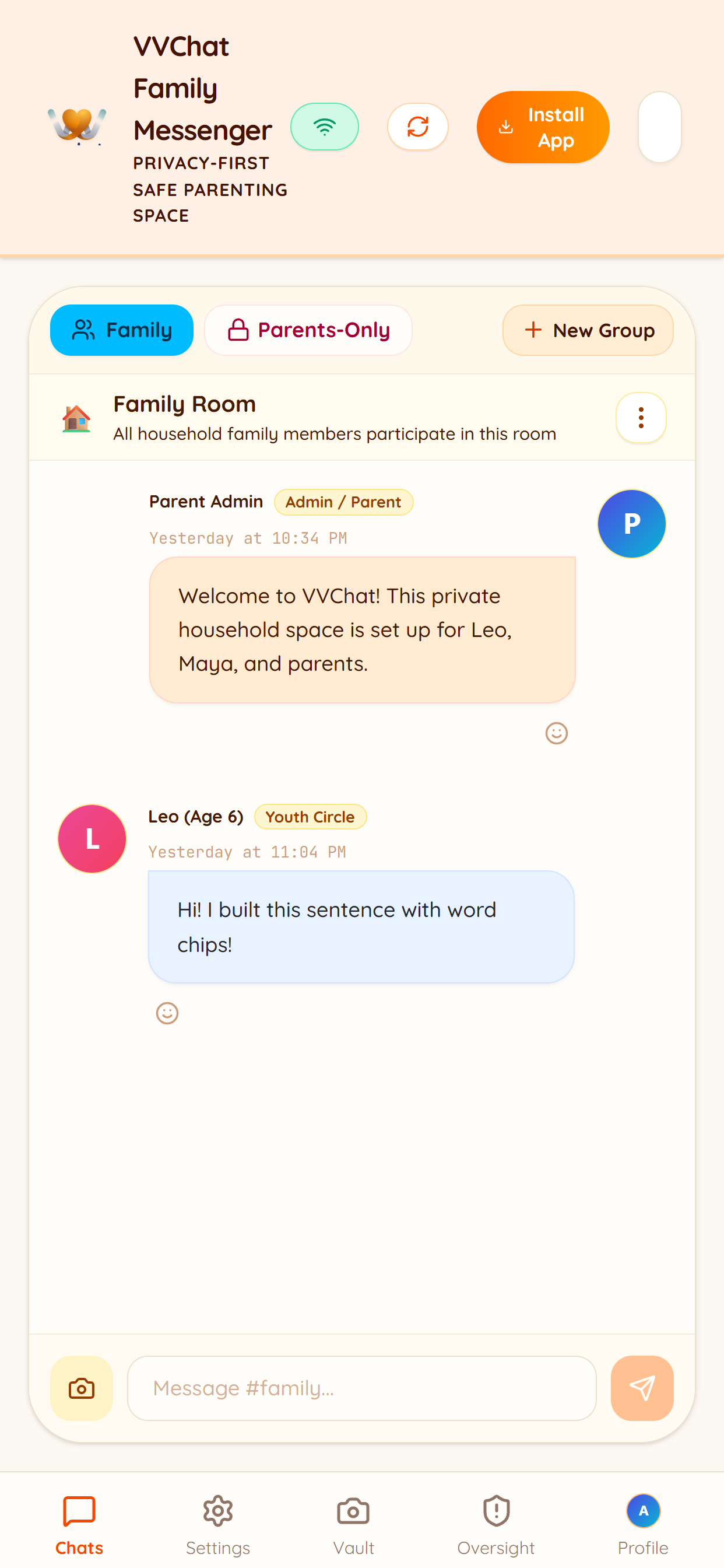
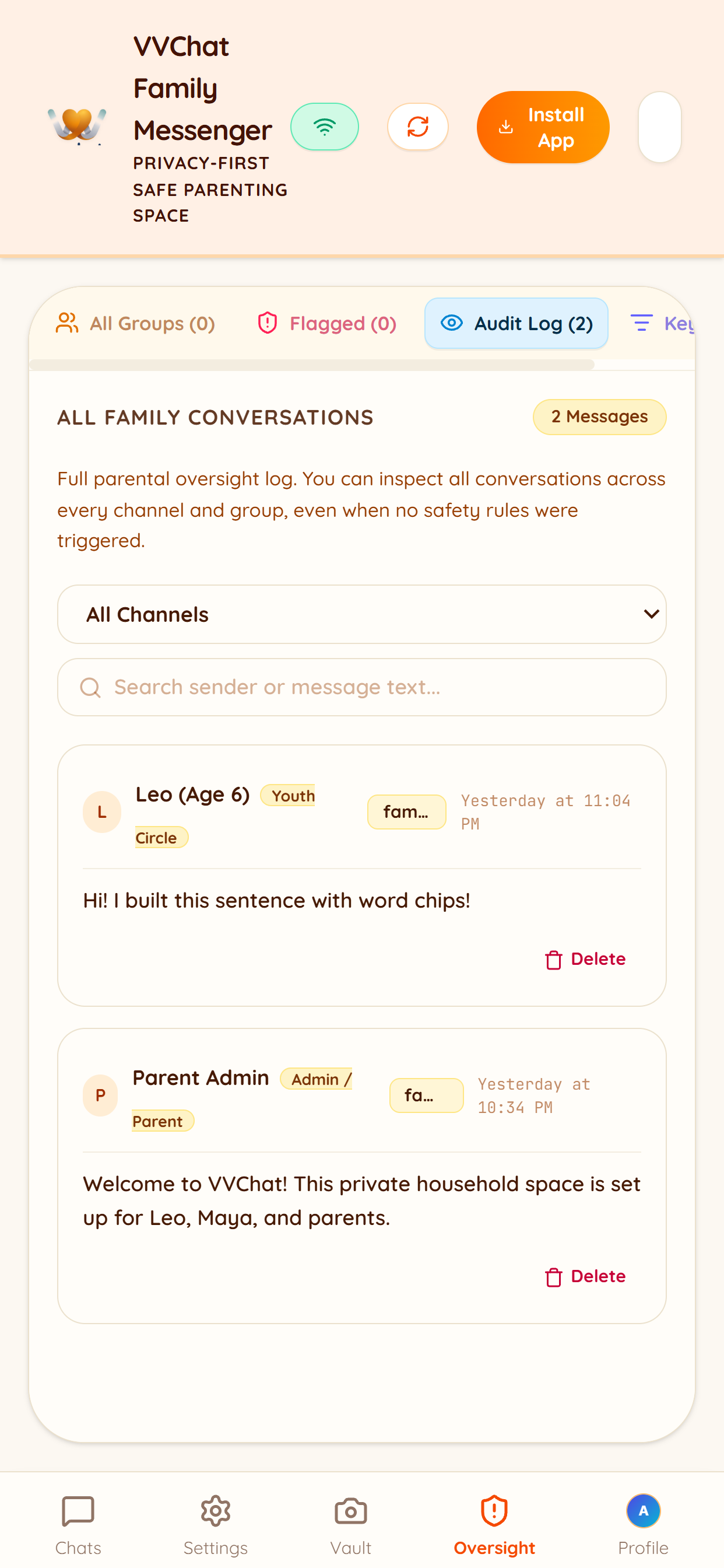
A clean, warm, and joyful interface designed for young children learning to write and parents keeping family communications safe.
The Best Family Chat Experience
Why parents and children love using the installed VVChat app on their phones and tablets.
Distraction-Free Fullscreen
Removes browser URL bars, tabs, and search prompts so young children ages 4–9 can focus completely on reading and writing family messages.
Real-Time Push Alerts
Receive immediate sound and banner alerts on Android and iOS whenever grandparents, parents, or siblings write new sentences.
One-Tap Claim Code Login
Children never need to memorize complex passwords or email addresses. Family seats are activated securely using parent-issued claim codes.
100% Private & Safe
Zero public directories, zero advertisements, zero behavioral tracking, and strict parent oversight create a completely safe communication space.
Frequently Asked Questions
How do I install VVChat on my Android phone or tablet? ↓
You can download VVChat directly from the Google Play Store by searching for "VVChat" (by Frederick Lu) or tapping the Google Play button on this page. Tap Install, open the app, and enter your family claim code.
How do I install VVChat on my iPhone or iPad? ↓
You can download VVChat directly from the Apple App Store by searching for "VVChat - Family Messaging" (by Frederick Lu) or tapping the App Store button on this page. Tap Get, open the app, and enter your family claim code.
What is an 8-character family claim code? ↓
A claim code is a safe, easy-to-type 8-character code (e.g., ABCD-1234) generated by the family organizer inside the Parent Admin view at chat.vvchat.app. When a child or family member enters this code into their installed app, their device is immediately connected to the private family circle without needing an email or password.
Do push notifications work on both Android and iPhone? ↓
Yes! Both the official Google Play Android app and Apple App Store iOS app support native push notifications out-of-the-box. Additionally, if you install VVChat as a Safari Home Screen web app on iOS 16.4+, web push notifications are also fully supported.
Can I use VVChat without installing any apps? ↓
Yes! VVChat works directly in any modern desktop or mobile browser. Simply visit https://chat.vvchat.app on your computer, Chromebook, or tablet to log in and chat.
Request Parent Beta Access Approval
Installed VVChat from Google Play or the App Store? Because VVChat is currently in Free Beta, enter your parent email below to receive instant authorization for your household administrator account.
Ready to Start Safe Family Messaging?
Install VVChat on your family's phones and tablets to connect kids with approved loved ones in a distraction-free space.